TikTokの写真をすぐにダウンロード
TikTok Photo Downloaderを使うと、個別の写真も含めてTikTok写真を即座にダウンロードできます スライドショー画像。このツールは、ワンクリックで遅延なく高速にアクセスでき、あらゆる画像を保存できます。 複雑な手順やサインアップをせずにダウンロードしたいユーザーに最適です。
Open TikTok and locate the photo or slideshow post you want to save. TikTok photo posts show multiple images with synced background music, tap Share to get the link.
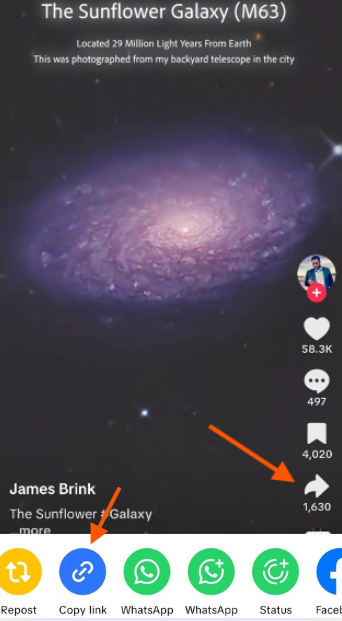
On the share menu, select Copy Link to get the photo post URL. This link is what SSSTikTok uses to detect and extract all individual images from the slideshow.
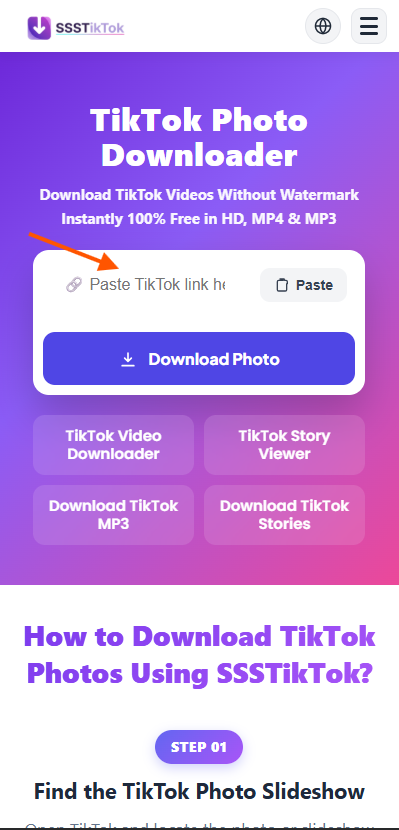
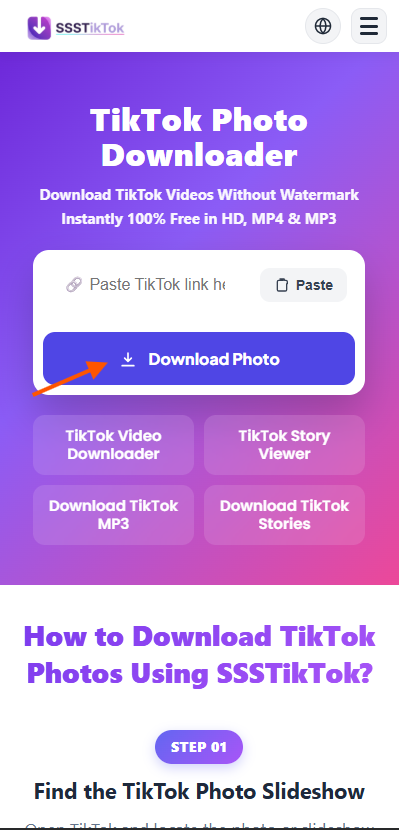
Go to SSSTikTok's TikTok Photo Downloader page and paste the link into the search bar. Click Download Photo to instantly load a preview of all images in the slideshow.
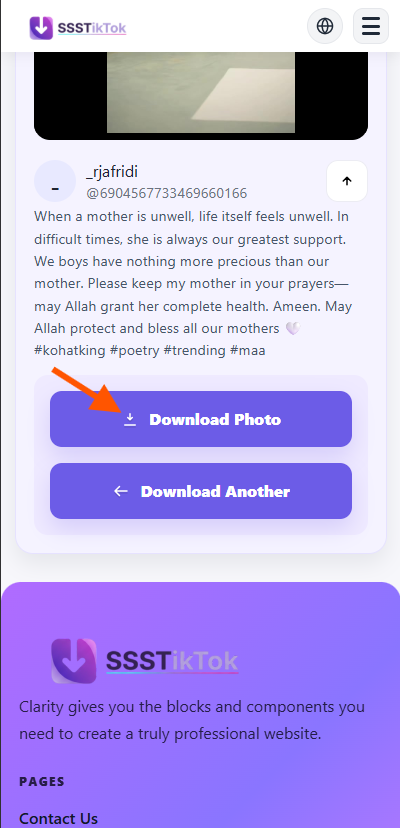
Download individual images as JPGs watermark-free, or convert the entire slideshow into an MP4 video with the original audio. All downloads are free, HD, and instant.
TikTok Photo Downloaderを使うと、個別の写真も含めてTikTok写真を即座にダウンロードできます スライドショー画像。このツールは、ワンクリックで遅延なく高速にアクセスでき、あらゆる画像を保存できます。 複雑な手順やサインアップをせずにダウンロードしたいユーザーに最適です。
ビデオ形式を希望する場合は、TikTok スライドショーを MP4 に変換する機能を使用して、TikTok スライドショーを MP4 に変換します。 この機能は、スライドショーを再生可能なクリップとして共有したいクリエイターに最適です。 編集または再投稿のためにビジュアルを保存するこの機能により、ダウンロードしたビデオがプロフェッショナルな見た目となり、 のようにすぐに使用できますTikTokビデオダウンローダーメディアを扱います。
内蔵コンバーターを使用して、オーディオが同期された TikTok スライドショーを MP3 ファイルに変換します。 サウンドトラック、ナレーション、トレンドのTikTokサウンドを抽出して再利用します。高速変換とクリア むしろが優れているため、お気に入りのトラックを保存しておいて、いつでも編集したりオフラインで聴くことができます。追加のツールは必要ありません。 必要です。
ダウンローダーはTikTokロゴを削除し、透かしのないきれいな写真を提供します。 TikTokのウォーターマークを使用する リムーバーを使用して、スライドショーや投稿から洗練されたプロ品質の画像を保存します。保存したコンテンツは、 常に考えかつ明白で、ポートフォリオ、ソーシャルメディア、または創造的なプロジェクトで少しのものを追加する全面共有準備ができています。 編集中。
主要プラットフォームをすべてサポート。ChromeやSafariで常に一貫した品質を提供します。
データを保存しない安全なダウンロード。サブスクリプション不要、完全無料で利用可能。
制限や登録なしで、好きなだけ写真やスライドショーを高品質で保存できます。
写真をJPGとして保存、またはアルバム全体を音楽付きの動画に変換して保存。
アカウント設定不要。ブラウザから直接アクセスして、匿名で写真をダウンロードできます。
最高解像度でTikTok写真を保存。処理も高速で、待ち時間なしのクリアな画質。
Quick answers about saving TikTok slideshows and images in HD.
To download a TikTok photo slideshow, simply copy the URL of the post and paste it into the search box above. Our tool will process the link and display all the individual photos from the slideshow, allowing you to save them one by one in high definition directly to your device.
Yes, SSSTikTok lists every image in the slideshow separately. You can choose to download all of them sequentially or pick only the specific photos you need. This gives you full control and ensures you don't waste storage on images you don't want.
Absolutely. We extract the original, high-resolution images as uploaded by the content creator. Whether it's a single snapshot or a multi-photo post, you will receive the best possible HD quality without any extra compression or loss in detail.
Yes! Our tool also detects the audio track used in the photo slideshow. You can use our TikTok MP3 Downloader to extract and save the background music as a high-quality 320kbps MP3 file.
On iPhone and Android, simply use your mobile browser (like Safari or Chrome). Paste the TikTok link into our tool, and when the images appear, tap and hold on a photo to "Save to Photos" or use the dedicated download buttons provided for each image.
Yes, our service is 100% free with no registration required. You can download as many photos and slideshows as you want without any daily caps, hidden fees, or time limits, making it the most convenient TikTok image saver available.